In today’s digital-first world, businesses and individuals increasingly rely on cloud hosting to store, manage, and process data. From small startups to global enterprises, cloud platforms offer flexibility, scalability, and cost-efficiency that traditional infrastructure simply cannot match. However, with these advantages comes a critical responsibility: ensuring the security of your data in the cloud.
Cloud hosting security is no longer optional—it is essential. Cyber threats are evolving rapidly, and without proper protection strategies, sensitive information can be exposed, stolen, or lost. In this comprehensive guide, we will explore how cloud hosting security works, the risks involved, and the most effective strategies to protect your data.
What Is Cloud Hosting Security?
Cloud hosting security refers to the technologies, policies, controls, and practices used to protect data, applications, and infrastructure in cloud environments. It covers everything from network security and data encryption to identity management and compliance.
Unlike traditional IT environments, cloud security operates under a shared responsibility model. This means:
- The cloud provider is responsible for securing the infrastructure.
- The user (you or your organization) is responsible for securing data, applications, and access.
Understanding this division is crucial for building a strong security posture.
Why Cloud Security Matters
Cloud environments are prime targets for cybercriminals because they often contain valuable data such as:
- Customer information
- Financial records
- Intellectual property
- Login credentials
A single breach can result in:
- Financial losses
- Legal consequences
- Damage to reputation
- Loss of customer trust
Therefore, investing in cloud hosting security is not just a technical requirement—it’s a business necessity.
Common Cloud Security Threats
Before implementing solutions, it’s important to understand the threats you are protecting against.
1. Data Breaches
Unauthorized access to sensitive data is one of the most serious risks. Weak passwords, misconfigured settings, or insecure APIs often cause breaches.
2. Misconfiguration
Incorrect cloud settings (like public storage buckets) can expose data unintentionally.
3. Insider Threats
Employees or contractors with access to systems can misuse data intentionally or accidentally.
4. DDoS Attacks
Distributed Denial-of-Service attacks can overwhelm cloud services, causing downtime.
5. Malware and Ransomware
Malicious software can infiltrate systems and lock or steal data.
6. Account Hijacking
Attackers can gain access to user accounts through phishing or credential theft.
Key Principles of Cloud Security
To protect your data effectively, follow these foundational principles:
1. Confidentiality
Ensure that only authorized users can access sensitive data.
2. Integrity
Maintain the accuracy and consistency of data.
3. Availability
Ensure that data and services are accessible when needed.
These three principles form the CIA Triad, the cornerstone of cybersecurity.
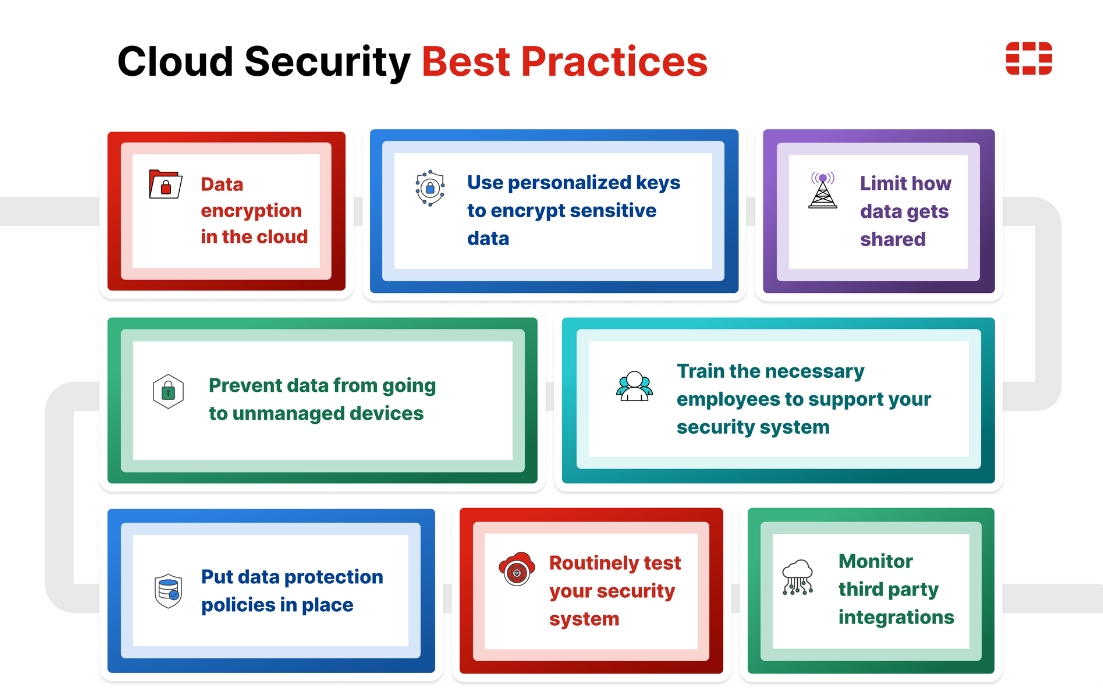
Best Practices for Cloud Hosting Security
1. Use Strong Authentication and Access Control
Implement strict access control policies:
- Use strong, unique passwords
- Enable multi-factor authentication (MFA)
- Apply role-based access control (RBAC)
- Grant minimum necessary permissions
This reduces the risk of unauthorized access significantly.
2. Encrypt Your Data
Encryption is one of the most effective ways to protect data.
- Encrypt data at rest (stored data)
- Encrypt data in transit (during transfer)
- Use secure protocols like HTTPS and TLS
Even if attackers gain access, encrypted data remains unreadable.
3. Regularly Update and Patch Systems
Outdated software is a common entry point for attackers.
- Apply security patches promptly
- Keep operating systems and applications updated
- Monitor vulnerabilities continuously
Automation tools can help manage updates efficiently.
4. Monitor and Log Activity
Visibility is key to detecting threats early.
- Enable logging for all systems
- Monitor user activity and access patterns
- Use Security Information and Event Management (SIEM) tools
Real-time monitoring allows quick response to suspicious behavior.
5. Backup Your Data
Data loss can happen due to cyberattacks, hardware failure, or human error.
- Perform regular backups
- Store backups in multiple locations
- Test recovery processes regularly
A reliable backup strategy ensures business continuity.
6. Secure APIs and Interfaces
Cloud services rely heavily on APIs.
- Use secure authentication methods
- Validate all inputs
- Limit API exposure
- Monitor API usage
Unsecured APIs are a common vulnerability.
7. Implement Network Security Measures
Protect your cloud network with:
- Firewalls
- Intrusion detection systems (IDS)
- Virtual private clouds (VPCs)
- Network segmentation
These measures help isolate and protect sensitive resources.
8. Use Identity and Access Management (IAM)
IAM systems help control who can access what.
- Define user roles clearly
- Regularly review access permissions
- Remove unused accounts
- Enforce least privilege policies
Proper IAM reduces insider threats and accidental exposure.
9. Conduct Security Audits and Compliance Checks
Regular audits help identify weaknesses.
- Perform vulnerability assessments
- Conduct penetration testing
- Ensure compliance with standards like GDPR, HIPAA, or ISO 27001
Compliance not only improves security but also builds trust.
10. Educate Your Team
Human error is one of the biggest security risks.
- Train employees on cybersecurity best practices
- Teach how to recognize phishing attacks
- Promote secure password habits
A well-informed team is your first line of defense.
Advanced Cloud Security Strategies
1. Zero Trust Architecture
Zero Trust assumes that no user or system is automatically trusted.
- Verify every access request
- Continuously monitor behavior
- Enforce strict identity verification
This approach significantly reduces attack surfaces.
2. Cloud Security Posture Management (CSPM)
CSPM tools automatically detect and fix misconfigurations.
- Identify compliance issues
- Monitor cloud environments continuously
- Provide automated remediation
This helps maintain a secure configuration at all times.
3. Data Loss Prevention (DLP)
DLP solutions prevent sensitive data from being leaked.
- Monitor data transfers
- Block unauthorized sharing
- Classify sensitive data
DLP is essential for protecting confidential information.
4. Endpoint Security
Ensure that devices accessing the cloud are secure.
- Use antivirus and anti-malware tools
- Enforce device security policies
- Monitor endpoint activity
Compromised devices can become entry points for attackers.
Choosing a Secure Cloud Hosting Provider
Not all cloud providers offer the same level of security. When selecting a provider, consider:
- Security certifications (ISO, SOC, etc.)
- Data encryption capabilities
- Compliance with regulations
- Availability of security tools
- Support and incident response
A reliable provider forms the foundation of your security strategy.
Shared Responsibility Model Explained
Understanding your responsibilities is crucial.
Cloud Provider Responsibilities:
- Physical security
- Infrastructure security
- Hardware maintenance
User Responsibilities:
- Data protection
- Access management
- Application security
- Configuration settings
Failing to secure your part can lead to vulnerabilities, even if the provider is highly secure.
Common Mistakes to Avoid
- Using weak passwords
- Ignoring software updates
- Misconfiguring storage settings
- Failing to monitor activity
- Not backing up data
- Granting excessive permissions
Avoiding these mistakes can significantly reduce risks.
Future Trends in Cloud Security
Cloud security continues to evolve with new technologies:
1. AI and Machine Learning
Used for threat detection and automated response.
2. Automation
Reduces human error and improves efficiency.
3. Serverless Security
Focuses on securing event-driven architectures.
4. Multi-Cloud Security
Manages security across multiple cloud providers.
Staying updated with these trends helps maintain a strong security posture.
Conclusion
Cloud hosting offers incredible benefits, but it also introduces new security challenges. Protecting your data requires a proactive and comprehensive approach that combines technology, policies, and user awareness.
By implementing strong authentication, encryption, monitoring, and regular audits, you can significantly reduce the risk of cyber threats. Additionally, adopting advanced strategies like Zero Trust and CSPM ensures long-term security in an ever-changing digital landscape.
Remember, cloud security is not a one-time effort—it is an ongoing process. The more vigilant and prepared you are, the better you can protect your valuable data and maintain trust in your digital operations.