Migrating to a Finance SaaS platform is one of the most strategic decisions a modern business can make. Whether you’re moving away from legacy accounting systems, spreadsheets, or on-premise ERP solutions, adopting cloud-based financial software can unlock efficiency, scalability, automation, and real-time insights.
However, a poorly planned migration can lead to data loss, operational disruption, compliance risks, and employee resistance. That’s why a structured, step-by-step approach is essential.
In this comprehensive 2026 guide, you’ll learn exactly how to migrate to a Finance SaaS platform—from planning and preparation to execution and optimization.
What Is a Finance SaaS Platform?
A Finance SaaS (Software-as-a-Service) platform is a cloud-based financial management system that allows businesses to manage accounting, billing, forecasting, reporting, and compliance online.
Popular examples include:
- QuickBooks Online
- Xero
- NetSuite
- FreshBooks
Unlike traditional software, SaaS platforms are:
- Hosted in the cloud
- Subscription-based
- Accessible from anywhere
- Automatically updated
Why Migrate to Finance SaaS?
Before diving into the process, it’s important to understand the benefits:
1. Real-Time Financial Visibility
Access up-to-date financial data anytime, enabling faster decision-making.
2. Cost Efficiency
Reduce infrastructure, maintenance, and IT staffing costs.
3. Automation
Automate invoicing, reconciliation, payroll, and reporting.
4. Scalability
Easily grow your system as your business expands.
5. Security & Compliance
Top SaaS providers offer enterprise-grade security and compliance standards.
Step-by-Step Guide to Migrating to Finance SaaS
Step 1: Define Your Migration Goals
Start by identifying why you’re migrating.
Ask yourself:
- Are you replacing outdated systems?
- Do you need better reporting?
- Are you scaling your business?
- Do you want automation?
Pro Tip: Set measurable goals like:
- Reduce manual work by 50%
- Cut reporting time by 70%
- Improve financial accuracy
Step 2: Assess Your Current Financial System
Conduct a full audit of your existing setup:
Evaluate:
- Accounting software or spreadsheets
- Data structure and formats
- Integrations (CRM, payroll, ERP)
- Reporting workflows
- Pain points and inefficiencies
Identify:
- Redundant processes
- Data inconsistencies
- Compliance gaps
This step ensures you don’t carry over inefficiencies into your new system.
Step 3: Choose the Right Finance SaaS Platform
Not all SaaS platforms are equal. Choose one based on your needs.
Key Criteria:
1. Business Size Compatibility
- SMEs: Xero
- Large enterprises: NetSuite
2. Features
- Invoicing
- Payroll
- Expense tracking
- Financial forecasting
3. Integration Capabilities
Ensure it connects with tools like:
- CRM systems
- Payment gateways
- E-commerce platforms
4. Pricing Model
Understand subscription tiers and hidden costs.
5. User Experience
A simple UI reduces training time.
Step 4: Create a Migration Plan
A solid migration plan minimizes risks.
Your plan should include:
- Timeline (phased vs full migration)
- Roles and responsibilities
- Data migration strategy
- Testing procedures
- Backup plans
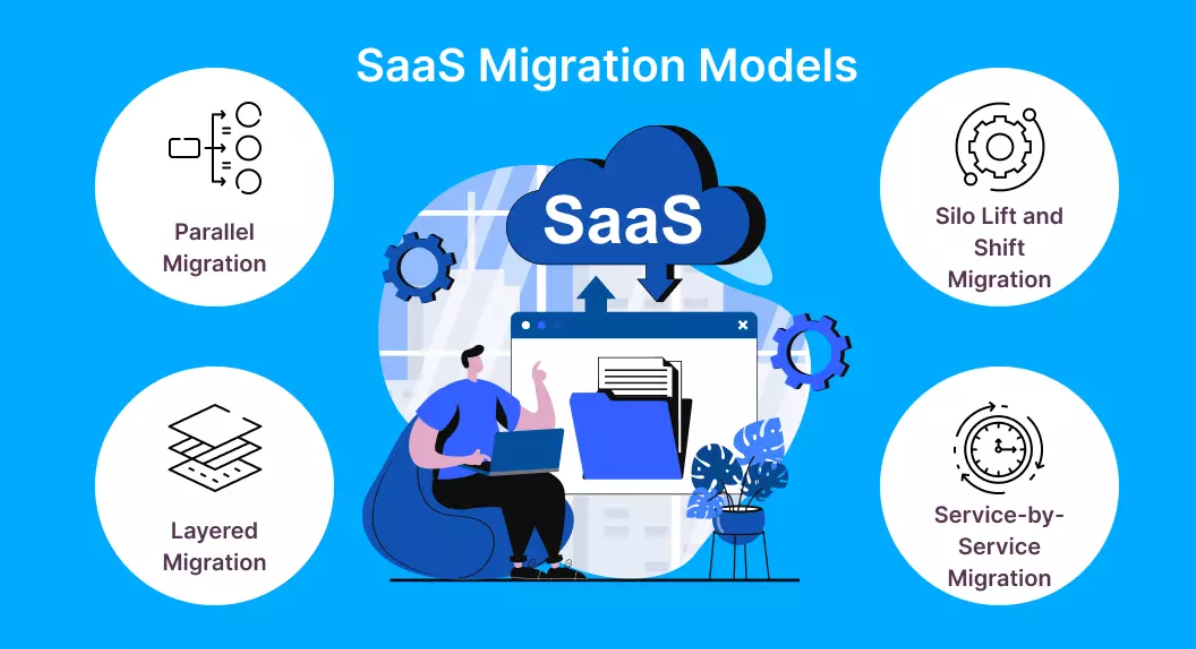
Migration Approaches:
- Big Bang Migration: All at once
- Phased Migration: Gradual transition
Best Practice: Use phased migration for lower risk.
Step 5: Clean and Prepare Your Data
Data quality is critical.
Actions to take:
- Remove duplicate records
- Standardize formats
- Archive outdated data
- Validate financial records
Data to migrate:
- Chart of accounts
- Customer/vendor data
- Transactions
- Financial reports
Warning: Poor data = poor insights.
Step 6: Backup Everything
Before migration, create a full backup of your system.
Backup includes:
- Databases
- Financial records
- Reports
- User data
Store backups securely in:
- External drives
- Cloud storage
This ensures recovery in case of failure.
Step 7: Set Up the New SaaS Platform
Configure your new system:
Setup tasks:
- Company profile
- Chart of accounts
- Tax settings
- Currency preferences
- User roles and permissions
Tip:
Match your old system structure to avoid confusion.
Step 8: Migrate Your Data
Now it’s time to move your data.
Methods:
- Manual entry (small data)
- CSV import
- API integration
- Migration tools
Many platforms like QuickBooks Online offer built-in import features.
Best Practices:
- Migrate in batches
- Validate each step
- Keep logs
Step 9: Test the System Thoroughly
Testing is critical before going live.
Test areas:
- Data accuracy
- Reports
- Transactions
- Integrations
- User access
Perform:
- Unit testing
- System testing
- User acceptance testing (UAT)
Fix issues before full deployment.
Step 10: Train Your Team
User adoption is key to success.
Training methods:
- Live workshops
- Video tutorials
- Documentation
- Hands-on practice
Focus on:
- Daily workflows
- Reporting
- Automation tools
Tip: Assign “power users” to help others.
Step 11: Go Live (Deployment)
Once everything is ready:
Go-live checklist:
- Final data validation
- Backup confirmation
- Team readiness
- Support availability
Choose a low-activity period to minimize disruption.
Step 12: Monitor and Optimize
Migration doesn’t end at launch.
Monitor:
- System performance
- User adoption
- Data accuracy
Optimize:
- Automate workflows
- Improve reporting
- Adjust configurations
Continuous improvement ensures long-term success.
Common Challenges and How to Overcome Them
1. Data Loss
Solution: Always backup and validate data.
2. Integration Issues
Solution: Test integrations early.
3. Employee Resistance
Solution: Provide training and support.
4. Downtime Risks
Solution: Use phased migration.
5. Cost Overruns
Solution: Plan budget carefully.
Best Practices for a Smooth Migration
- Start with a pilot project
- Use experienced consultants if needed
- Document every process
- Communicate with stakeholders
- Set realistic timelines
Migration Timeline Example
| Phase | Duration |
|---|---|
| Planning | 1–2 weeks |
| Data Preparation | 2–4 weeks |
| Migration & Testing | 2–3 weeks |
| Training | 1–2 weeks |
| Go Live | 1 week |
Total: 6–12 weeks depending on complexity.
Who Should Be Involved?
A successful migration requires collaboration:
- Finance team
- IT department
- Project manager
- SaaS vendor support
- External consultants (optional)
Cost Considerations
Direct Costs:
- Subscription fees
- Migration tools
- Consulting services
Indirect Costs:
- Training time
- Temporary productivity loss
ROI:
- Reduced operational costs
- Increased efficiency
- Better decision-making
Future Trends in Finance SaaS Migration
1. AI-Powered Automation
Platforms increasingly use AI for:
- Forecasting
- Fraud detection
- Expense categorization
2. API-First Ecosystems
Seamless integrations across business tools.
3. Real-Time Analytics
Instant dashboards and insights.
4. Global Compliance Tools
Automated tax and regulatory updates.
Final Thoughts
Migrating to a Finance SaaS platform is not just a technical upgrade—it’s a transformation of how your business manages money, data, and decision-making.
By following a structured, step-by-step approach:
- Define goals
- Assess systems
- Choose the right platform
- Plan carefully
- Clean your data
- Test thoroughly
- Train your team
- Optimize continuously
You can ensure a smooth transition with minimal risk and maximum ROI.
Conclusion
In today’s fast-paced digital economy, staying competitive means embracing modern tools. Finance SaaS platforms offer agility, automation, and intelligence that traditional systems simply can’t match.
A successful migration requires planning, execution, and continuous improvement—but the rewards are well worth the effort.
If done correctly, your business will gain:
- Faster financial insights
- Better accuracy
- Improved scalability
- Stronger competitive advantage